Import Run
Import Run functionality will allow that you import previously saved run:
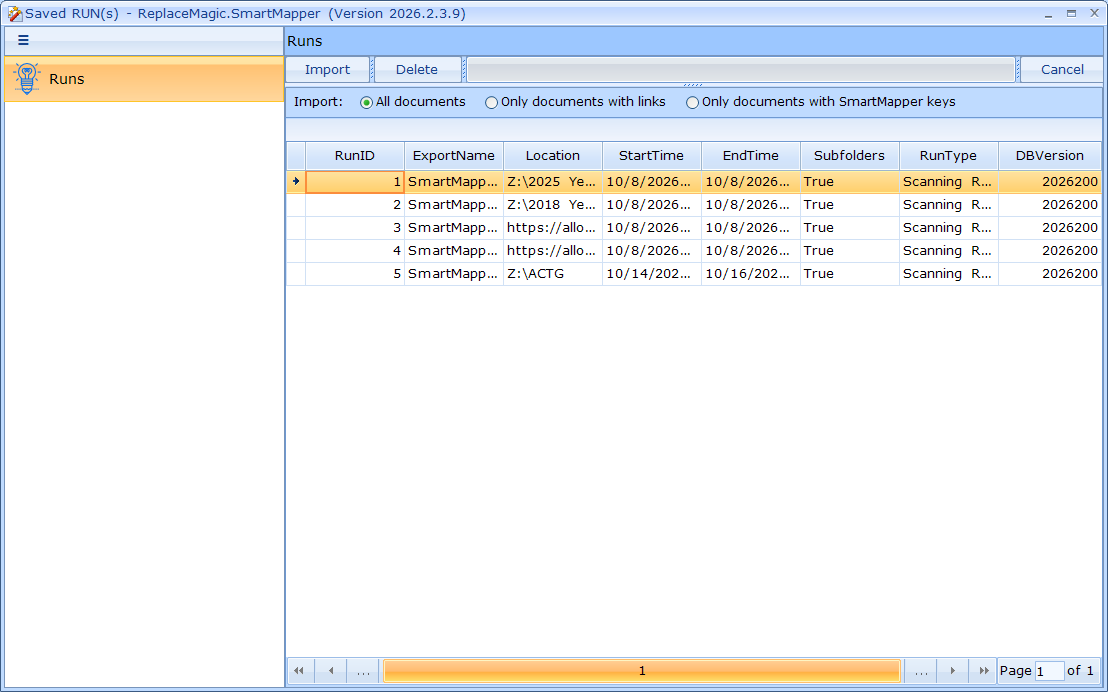
Where either double click on run or Run selection (single click) and then Import button will load saved data and, in case of SharePoint, create connection so that processing can start immediately.
Additional, it is possible to delete existing run with Delete button.
Which documents are imported. In the row above the runs choose:
- All documents (default) - every scanned document of the run is imported.
- Only documents with links - only documents in which the scan found links (hyperlinks, OLE links, link sources, pivot tables or Power Queries).
- Only documents with SmartMapper keys - only the documents for which SmartMapper created Search & Replace keys, i.e. exactly the documents the replacement will change.
The documents grid shows only the imported documents, and a message after the import says how many documents were imported and how many were skipped. For SharePoint runs the SharePoint files of the skipped documents are skipped as well. If the run has no link counts (an Ultra fast scan) or no SmartMapper keys yet, all documents are imported and you are told so.
Use the two "Only ..." options for link replacement only. If you also replace other text in the documents, keep All documents, because documents without links would not be opened.