SharePoint 2
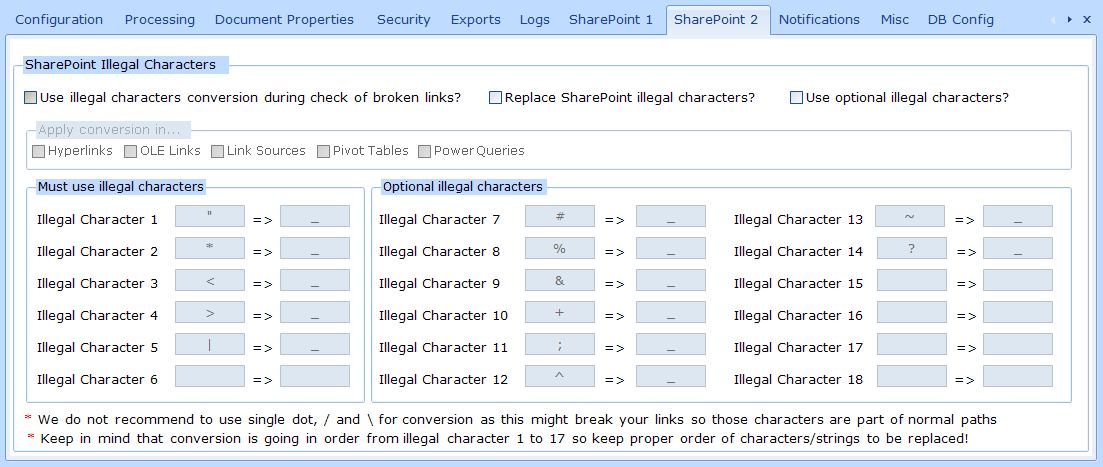
During migration to SharePoint some characters which were allowed in other file storage types might not be allowed any more on SharePoint (good article from ShareGate: https://help.sharegate.com/en/articles/10236480-special-and-illegal-characters).
ReplaceMagic offers option to convert special characters during links replacements. Available options:
- Use illegal characters conversion during check of broken link? - by setting this ReplaceMagic will convert provided illegal characters during check of broken links. Keep in mind that by using this setting nothing will be persisted in affected links
- Replace SharePoint illegal characters? - with this parameter illegal characters will be replaced with provided value and saved when document is saved. For replacements are used illegal characters from group "Must use illegal characters"
- Use optional illegal characters? - in case that this option is also selected (it can be selected only if "Use illegal characters conversion during check of broken link?" or "Replace SharePoint illegal characters?" are selected, ReplaceMagic will use this set of characters also
- Apply conversion in - here you can specify in which link area conversion of illegal characters should be done
- Must use illegal characters (1-6) - set of illegal characters which will be always used for conversion
- Optional illegal characters (7-18) - set of illegal characters which will be used only if "Use optional illegal characters" is selected